.svg)
Most password managers rely on vendor-hosted infrastructure. The recent breaches have shown that even with strong cryptographic foundations, centralizing vaults on vendor servers creates a honeypot and a single point of failure. Breached data continues to be harvested and reused in subsequent attacks, many of which trace back to password manager compromises. Data residency adds another layer of risk. Globally distributed teams and highly regulated institutions must comply with evolving privacy laws and internal policies governing sensitive data storage. Even a self-hosting solution will require complex orchestration of the data-residency layer. The call for data sovereignty now extends well beyond the traditional scope of zero-knowledge security.
Enpass uses a unique distributed architecture to deliver all the capabilities of a modern password manager without storing vault data on our servers. This ensures sovereign control of your data without the burden of self-hosting complex infrastructure. Every design choice in Enpass follows core security principles:
-
Data Sovereignty (“Zero Possession”)
A fundamental design principle of Enpass is giving you full ownership of your data. Enpass never stores your credential vaults on its own infrastructure. Instead, your encrypted vault resides on your trusted environment (Microsoft 365 OneDrive/Sharepoint, Google Workspace, etc). This minimizes the attack surface, as there is no central repository holding thousands of vaults and thus no single point of failure. -
Use of Proven Cryptography
Enpass exclusively relies on peer-reviewed, industry-standard cryptographic algorithms and implementations. We do not develop proprietary or untested cryptography. -
Zero Knowledge Everywhere
Enpass is designed with a zero-knowledge architecture, meaning only you can access your vault data. All cryptographic operations occur locally on your device, and any data that leaves the device is already encrypted with a key that only you possess. Enpass (the company) has no access to your vault, no control over its storage, and no ability to unlock it—therefore it cannot access or decrypt your data.
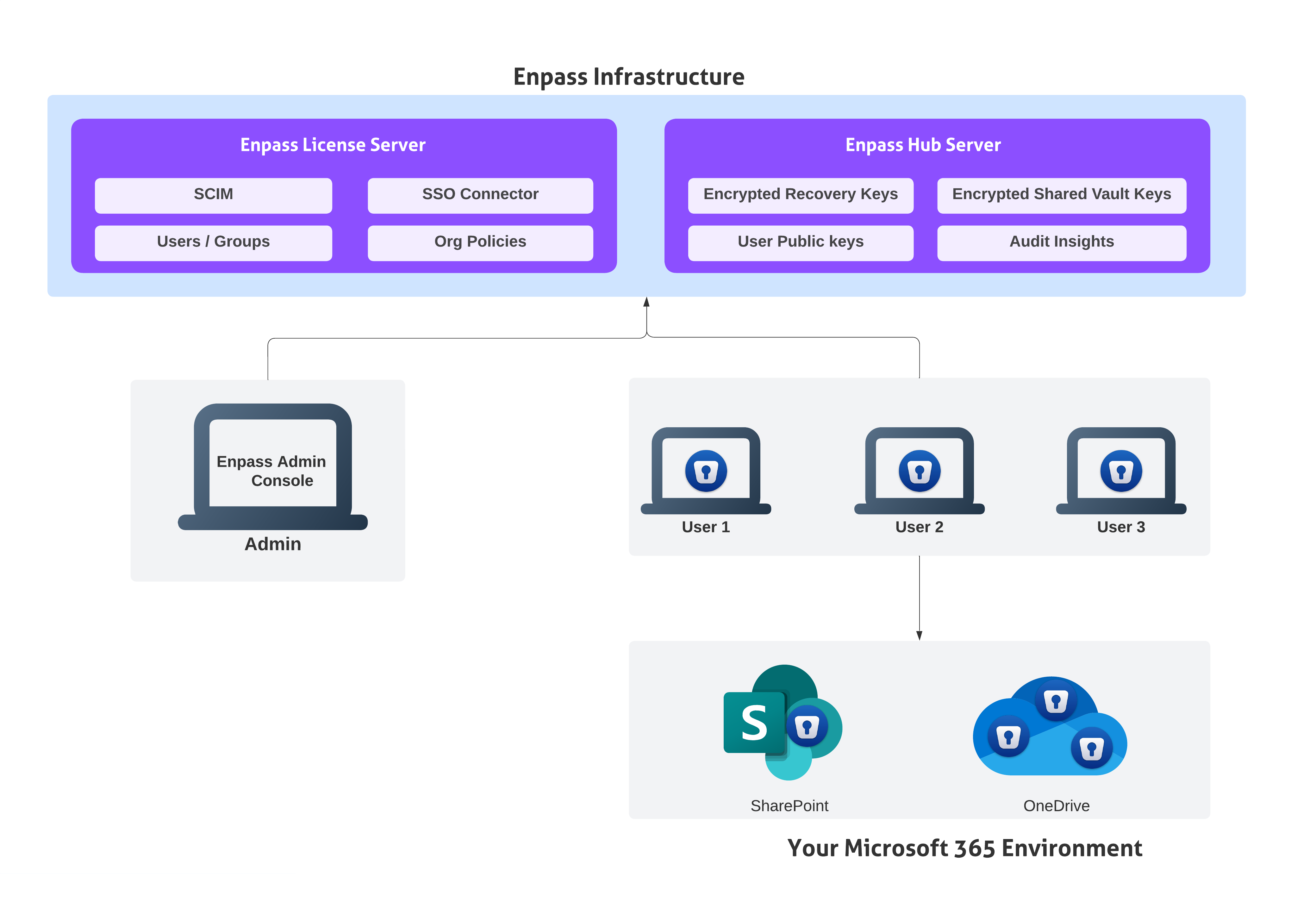
The architecture diagram represents how data is distributed across two different infrastructures, ensuring data sovereignty and residency requirements without the need to host any additional servers in your environment. The key components of the architecture are:
Your Environment
Enpass Vault
The Enpass vault is the core of the architecture, enabling the decoupling of password data from any centralized server. Credentials and other sensitive data are stored inside it as a fully encrypted blob, protected with industry-standard, quantum-resistant AES-256. The vault can only be opened with your master password (something you know) and/or a keyfile (something you have). All cryptographic operations occur locally on the user’s device, extending zero-knowledge guarantees regardless of where the vault is stored. (Read more about vault security here.)
Enpass App
The Enpass app communicates with your business storage and Enpass servers to provide the full functionality of a modern password manager. Enpass provides native applications for all platforms, running directly on the operating system instead of within hostile browser environments as a web app. This design also allows Enpass to work offline with a locally cached copy of the vault. Since encryption and decryption are always guaranteed to happen locally, it is the Enpass app that performs all cryptographic operations such as vault creation, synchronization, sharing, and admin-led account recovery.
Microsoft 365
The architecture distributes risk by ensuring vaults are never stored on Enpass infrastructure. This does not require you to self-host additional servers. Instead, vaults are stored within your trusted Microsoft 365 environment via OneDrive, while shared vaults can be conveniently stored in SharePoint or Teams. The architecture automatically inherits the access policies your organization already enforces, such as device trust, MFA, and conditional access. All Graph API permissions required by the Enpass app to communicate with Microsoft 365 are delegated, and access tokens are never stored on Enpass servers. Since your organization has already solved data residency at the enterprise layer with Microsoft 365, leveraging it eliminates the residency concerns.
Enpass Infrastructure
Enpass Hub Server
Distributed vault architecture should not mean the absence of collaboration features. Enpass Hub server enables collaboration and reporting functions such as key sharing and recovery, using time-tested public-key cryptography. However, it never stores actual vault contents. Only encrypted vault keys (protected with RSA-3072 asymmetric encryption), vault metadata and event logs are stored. Even in the unlikely event of a server compromise, attackers cannot access encrypted vaults, since neither vault data nor Microsoft 365 tokens are present on the server, and the vault keys are themselves encrypted with keys that exist only within the user’s vaults. (Read more about Enpass Hub security here.)
Enpass License Server
The license server is operated by Enpass to manage subscriptions and organizational accounts. It authenticates users, brokers initial connections to Enpass Hub, and stores organizational policies. It does not store vault data or vault metadata. Conceptually, it acts as the registry of “who is a valid Enpass user in Organization Z” and “what business features are enabled.”
Enpass Admin Console
The Enpass Admin Console is a web portal for organization administrators to manage accounts. The Admin Console runs as a static client-side app in the admin’s browser and communicates with the License Server and Hub via secured REST APIs. It ensures, even if an organization chooses to self-host the Enpass Hub on a restricted network as an additional security measure, admins can seamlessly manage it as if it were hosted by Enpass.
In summary, the Enpass distributed architecture ensures zero-knowledge security, high resilience against breaches, and true data sovereignty, without compromising the capabilities of a modern password manager. By keeping vaults within your trusted Microsoft 365 environment and ensuring Enpass servers hold only minimal metadata, the model eliminates single points of failure and mitigates data residency concerns. This design gives organizations the rare balance of control, compliance, and convenience without the risks of centralization or the complexity of self-hosting.